Latest update: 27 July 2026 - 10 min read
Driversnote vs CarSavvy: Which Vehicle Logbook App Is Best for You?
If you’re looking for the best logbook app in Australia, chances are both Driversnote and CarSavvy have made your shortlist.
Both apps:
- Track your trips automatically
- Produce ATO-compliant records
- Will spare you the paper logbook in your glovebox.
So which one should you choose?
The answer depends less on which app is “better” and more on what you need it to do. CarSavvy is an all-in-one car management app that includes a logbook alongside expense capture, a fuel finder and vehicle reminders. Driversnote is a dedicated vehicle logbook app built to do one job, compliant kilometre tracking, as well as possible.
In this comparison, we’ll walk through how each app handles automatic tracking, rideshare driving, expenses, and ATO compliance, so you can pick the one that fits the way you drive and claim.
TL;DR: Two different takes on a vehicle logbook app
Driversnote is a dedicated ATO logbook app. It’s been in the market for over 12 years, is used by more than 4 million drivers worldwide, and holds a 4.7-star average across 100,000+ app store reviews. It tracks trips automatically through your phone, or with an optional iBeacon for vehicle-specific tracking, and turns them into compliant reports you can hand straight to your accountant or employer. There’s also a Teams product for businesses that want to centralise kilometre tracking.
CarSavvy is a newer Australian app that treats the logbook as one part of managing your car. Alongside trip tracking, it offers AI-powered receipt capture, a fuel price finder, rego and service reminders, and a dedicated shift mode for rideshare drivers. It holds a 4.8-star rating on the Australian App Store, though from a smaller review base than more established apps.
The one-liner verdict
If you want a focused, proven logbook for tax time or reimbursement, Driversnote is for you.
If you want a single app for everything car-related, CarSavvy may suit you better.
At-a-glance comparison
| Feature | Driversnote | CarSavvy |
| Best for | ATO-compliant kilometre tracking and logging | All-in-one car management |
| Automatic tracking | Motion tracking via phone GPS, works from the first drive. Optional hardware (the iBeacon) for vehicle-specific tracking | Drive detection and Bluetooth car audio connection |
| Setup | Download the app and start tracking, no hardware needed | Download the app and connect to the car Bluetooth |
| Trip classification | One-swipe business/personal, plus automatic classification based on your work hours | Business/personal classification, plus shift mode for gig work |
| Expense tracking | Not included | AI receipt capture included |
| Vehicles | Unlimited vehicles, including motorcycles, scooters, and bikes | Multi-vehicle support |
| Team/business product | Driversnote Teams for organisations | No dedicated teams or enterprise product |
| Free tier | Up to 15 trips per month | 15 trip entries per month |
| Typical AU app rating | 4.7 ★ across 100,000+ reviews | 4.8 ★, smaller review base |
Automatic trip tracking in each app
Automatic tracking is the core of any logbook app, and both apps handle it well. The difference is in how they detect your trips.
Driversnote tracks with your phone, plus an optional iBeacon
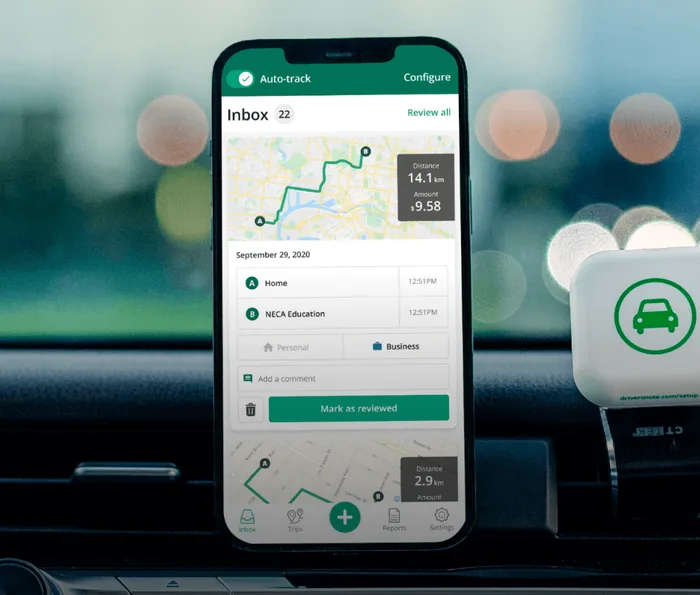
Driversnote’s automatic trip tracking uses your phone’s GPS and motion detection. Once you enable auto-tracking, the app starts recording as soon as you reach driving speed. No hardware is required to get started with motion tracking – just Driversnote and your phone.
If you want even more precision, you can add the optional iBeacon, a small Bluetooth device that lives in your car. With the iBeacon, the app only records trips taken in that specific vehicle, so you won’t need to weed out public transport journeys or trips where you were the passenger.
The iBeacon is included for free with an annual subscription.
CarSavvy tracks with Bluetooth car audio
CarSavvy detects trips automatically when your phone connects to your car’s Bluetooth audio system, combined with general drive detection. That works well if your car has Bluetooth and you always drive the same vehicle.
In short
Both apps start tracking on day one. The practical difference is flexibility: Driversnote’s phone-based tracking works in any vehicle, including older cars without Bluetooth, rentals, shared cars, and motorbikes, and the iBeacon is an optional refinement rather than a requirement.
Can rideshare and delivery drivers track every kilometre?
Yes, with both apps, though they go about it differently.
Here’s why it matters: Uber, DoorDash and similar platforms only record the kilometres you drive with a passenger or delivery on board. The kilometres in between jobs, while you wait for the next booking, are still work-related and claimable, but they don’t appear in the platform’s records. If your logbook app misses them, you’re leaving deductions on the table.
CarSavvy handles this with a dedicated Shift Mode. You start a shift when you begin working and end it when you’re done, and everything in between is recorded.
Driversnote handles it with automatic tracking and Work Hours. Because auto-tracking records every trip you take, the kilometres between jobs are captured without you doing anything. Set your work hours in the app, and every trip inside that window is automatically classified as business, while everything outside it defaults to personal. You review and approve trips from a simple inbox.
One Australian Uber driver put it well: The app “tracks all the kms I’m able to claim in between trips!”
The difference is workflow rather than capability. Shift mode asks you to remember to start and end each shift; Work Hours runs in the background once you’ve set it. If you drive for work regularly, our rideshare and delivery drivers’ tax guide covers what you can claim in more detail.
Do you need expense tracking in your logbook app?
This is the biggest genuine difference between the two apps, and whether it matters depends entirely on how you claim your car expenses.
If you use the cents per kilometre method, the ATO’s per-kilometre rate already covers all your running costs, including fuel, servicing, insurance and depreciation. You don’t need receipts at all, just an accurate record of your business kilometres. For the many Australians claiming this way, expense capture in a logbook app adds little.
If you use the logbook method, you claim your business-use percentage of your actual running costs, so you do need expense records alongside your logbook. This is where CarSavvy’s built-in AI receipt capture is a real convenience: photograph a receipt, and the app files it next to your trips. If you want everything in one app, that’s a strong argument for CarSavvy.
Driversnote deliberately doesn’t do receipts. It records what the logbook method requires from your driving, including odometer readings and your business-use percentage, and leaves expense records to wherever you already keep them, whether that’s your accounting software, your bank statements or your accountant. Many drivers, and their bookkeepers, prefer that separation. Others want one app for everything. Neither preference is wrong.
There’s a quieter benefit to the focused approach, too: Driversnote only collects your trips, distances and notes. No driving behaviour, fuel spend or engine data. If you’d rather your logbook app knew less about you, focus has its advantages.
ATO compliance, reporting, and pricing structure
Whichever app you choose, make sure it produces records the ATO will accept. Under the logbook method, that means a logbook covering at least 12 continuous weeks that’s representative of your driving, with odometer readings and the purpose of each journey. Each logbook is then valid for up to 5 years.
You can read more about the ATO logbook requirements in our guide.
Both apps produce compliant records. Driversnote generates one-click PDF and Excel reports showing your total kilometres, business/personal split and trip purposes, applies the latest ATO rate each financial year, and supports separate logs for an unlimited number of workplaces.
On pricing, both apps offer a free tier: Driversnote lets you log up to 15 trips per month for free, with monthly and annual subscriptions beyond that, and the annual plan includes a free iBeacon. Both apps change their pricing from time to time, so check the current Driversnote pricing and CarSavvy pricing before you decide.
Driversnote vs CarSavvy: Conclusion
Choosing between CarSavvy and Driversnote comes down to what you want from the app, not which one collects more features.
Choose Driversnote if you want a proven, focused ATO logbook app: Automatic tracking in any vehicle, effortless classification, compliant reports your accountant will love, and over a decade of track record behind it.
Choose CarSavvy if you want one app to manage your whole car, with receipt capture, fuel prices and rego reminders bundled alongside the logbook.
Either way, start before your next work trip. The 12-week logbook period only counts once you’re recording, and the easiest kilometre to claim is the one you never had to think about logging.
Get started for free and see how it fits your driving.\
Tired of logging mileage by hand?
Effortless. IRS-compliant. Liberating.
 Auto-track trips
 Classify trips
 IRS compliant reports