Latest update: 23 February 2026 - 15 min read
GOFAR vs Driversnote: Vehicle Logbook App Comparison
Keeping track of your business kilometres manually can be a real nuisance. You’ll know the pains well if you’ve tried keeping up with paper vehicle logs for reimbursement or tax deductions; think missed logs, messy spreadsheets, and the constant mental load of having to remember to jot down every drive and destination.
Which vehicle logbook solution is best for Australians?
Thankfully, with the rise of digital kilometre trackers on the Australian market, you have more options than ever for maintaining an ATO-compliant vehicle logbook that’s easy and realistic to keep up with - not just for the required 12 consecutive weeks of the year, but always. The mission now is to find a solution that best suits your needs and primary purpose, and we’re here to help you choose.
In this article, we’ll compare two strong players in the digital vehicle logbook game - GOFAR vs Driversnote - to give you a full overview of features, tax compliance, strengths, and weaknesses.
Let’s dive in.
TL;DR comparison
Although a lot of their features overlap, Driversnote and GOFAR take two fundamentally different approaches to tracking your vehicle use.
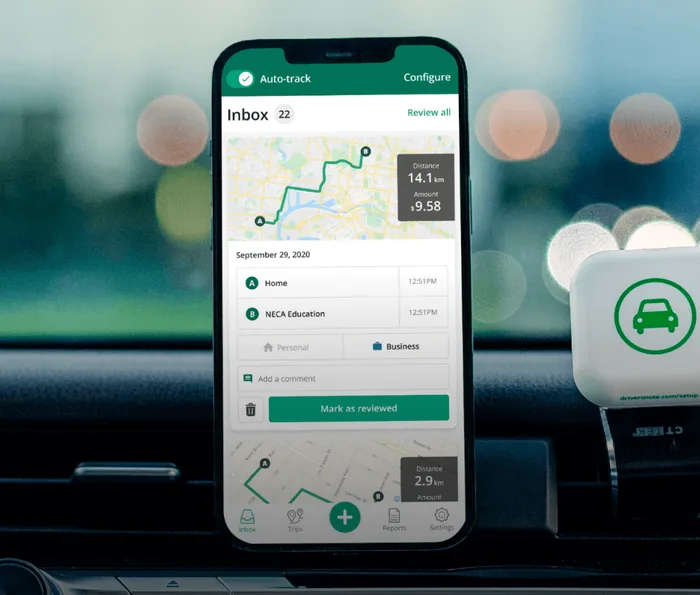
Driversnote is a dedicated ATO vehicle logbook app for automatic and compliant trip tracking. It works entirely on your phone, or with an optional iBeacon for even more accurate, streamlined automatic tracking. With the additional web app available, adjusting, categorising and annotating your trips is easy and quick, so you’re left with compliant reports you can send to your employer or accountant.
GOFAR is a physical OBD-II device that plugs into your car to provide advanced driving behaviour insights and engine diagnostics, with trip logging and categorisation available inside the app. You can’t use the app solely for trip tracking, as it’s required to register the device as you sign into the app.
The one-liner verdict
If your goal is a clean, simple, ATO-friendly logbook, Driversnote is for you.
If you want hardware-level driving analytics, GOFAR may be a better option.
Side note: Driversnote also offers a full Driversnote Teams solution for organisations that wish to centralise their kilometre tracking. GOFAR does not currently offer a Teams or multi-driver product.
At-a-glance comparison of key differences
| Feature | Driversnote | GOFAR |
| Best for | ATO-compliant km tracking & logging | Driving analytics & vehicle diagnostics |
| Tracking methods and devices |
|
|
| Setup | Download app → start tracking | Install hardware in car, app not necessary for tracking |
| Trip classification | Simple business/personal toggle | Simple business/personal toggle |
| ATO reporting | Purpose-built, clean exports in Excel & PDF | Spreadsheets reports exported to email |
| Privacy & compliance | GDPR-compliant | GDPR-compliant |
| Flexibility | Can be set up for multiple vehicles (also mopeds, scooters, motorcycles, or bikes) | Tied to one vehicle with the OBD port. Setting up multiple vehicles requires multiple devices. |
| Pricing model |
|
|
| Support | AU-based support team via chat and e-mail. Help Centre articles. | AU-based support team via e-mail. Knowledge base and FAQs. |
| Typical app rating [AU] in 2025 | 4.7 ★ on average (iOS / Android) | 4.5 ★ on average (iOS / Android) |
Who is each solution best suited for?
Driversnote
Perfect for:
- Drivers of cars that do not support OBD devices
- Anyone who wants an easy, ATO-compliant app logbook for tax purposes
- Those who switch between multiple vehicles, rentals, or shared cars
- Users who prefer to get an overview of trips and reports on desktop
GOFAR
Best for:
- Those who also want to monitor fuel use or driving behaviour
- People who want engine diagnostics without relying on a mobile app
- Drivers who prefer hardware over phone tracking
Kilometre tracking & classification features
Driversnote tracks with GPS technology and the iBeacon
When it comes to tracking trips, Driversnote relies on GPS motion tracking through the mobile app, allowing you to record every trip you take automatically.
For even better accuracy, you can pair the app with a small Bluetooth device – the iBeacon – that placed in your vehicle, only tracks trips taken with that specific car. That means no accidental tracking of public transport journeys, trips taken as a passenger, or false starts.
If you prefer to log trips manually, Driversnote supports that too, making it flexible for drivers who like more control over their entries.
GOFAR tracks with the OBD plug-in device
GOFAR approaches tracking differently. Instead of relying on your phone, it uses an OBD-II device that plugs into your car and automatically records every movement of the vehicle. Once the device is installed, GOFAR tracks trips in the background — even if you never open the accompanying app.
You can later use the GOFAR app to view your trips in detail, or classify them as business or personal. Like Driversnote, GOFAR offers saved locations to make classification smoother, but it does require the physical device to function at all; without it, the app cannot log trips.
In short
Both GOFAR and Driversnote offer core logbook essentials that significantly reduce manual labour for drivers, such as:
- Automatic mileage tracking
- Trip editing
- The ability to classify trips with one click or swipe
- Custom notes and trip purpose field for ATO compliance
- Saved locations and frequent routes
- Custom tags for additional trip labelling
Reporting, compliance & meeting the ATO requirements
Keeping a vehicle logbook isn’t just about tracking trips. If you want to make the most out of your tax return or maintain fair reimbursement, it’s about producing records that the ATO will actually accept.
This is where the difference between a dedicated logbook app and a general driving analytics tool becomes clear.
Driversnote is built specifically around ATO logbook requirements and the logbook method. With 12 years in the industry and 4 million users, the app has really proven its worth on the market.
Reports can be generated in PDF or Excel format and include all the necessary information for compliant record-keeping.
The easy, one-click exports clearly show:
- Total kilometres driven
- Business vs personal distance
- Trip purposes
- Total reimbursement calculated using ATO-approved rates
Beyond that, the app also displays the percentage split between business and private use.
Driversnote is particularly well-suited to this setup. It supports multiple kilometre rates, making it easy to adapt if your circumstances change or if you’re reimbursed at a different rate by your employer.
The result is a clean, easy-to-read logbook that can be shared directly with an accountant or used at tax time without additional formatting.
GOFAR automatically logs trips through its OBD-II device and lets you review them on a map inside the app. You can then export tax-compliant reports as spreadsheets, if you’re tracking for ATO purposes.
However, logbook reporting is not GOFAR’s primary focus. Because the device also captures detailed vehicle and driving data — such as engine information, emissions, and fuel spend — for drivers who only need mileage records, the extra data can feel unnecessary or tricky to navigate through.
GOFAR is therefore better suited to people who want vehicle insights alongside logbook tracking, rather than a streamlined, logbook-only experience.
App interface & ease of use
Driversnote is designed to get out of the way as quickly as possible. You can start tracking as soon as you install the app, with no hardware required.
Because it works in any car, it’s especially convenient for drivers who switch vehicles, use rentals, or drive a mix of personal and work cars. The interface is clean and easy to navigate, and categorising trips happens with a single tap.
Overall, Driversnote prioritises low setup effort and minimal ongoing maintenance.
GOFAR takes a more hands-on approach upfront. Using it requires locating your car’s OBD port and installing the hardware device, which then handles tracking automatically in the background. This works if you drive the same car consistently, but it does mean you’re tied to that specific vehicle. Since GOFAR tracks an array of different metrics, there’s a lot more going on on the screen. For drivers only interested in tracking their kilometers, the dashboard may look overload with information.
The app appears to depend on the OBD hardware to function, making GOFAR less flexible for shared cars or households with multiple vehicles.
Privacy & data control
Driversnote keeps data collection deliberately minimal. It records only what you need to maintain an ATO-compliant vehicle logbook: your trips, distances, and any notes you choose to add.
There is no tracking of driving behaviour, engine performance, or fuel usage. Because the tracking is app-based, you retain a clear sense of control over what’s being recorded and when. On top of that, Driversnote assures secure and reliable data storage with regular backups for increased safety.
This makes Driversnote a good fit for drivers who want a simple logbook without broader monitoring.
GOFAR takes a much more data-rich approach.
In addition to trip logging, it collects information about driving behaviour such as acceleration and braking, as well as fuel usage and engine diagnostics.
This can be valuable for drivers who want to dig deeper and get regular insights into how their car is performing, or how they drive. However, for users who only need a simple, straightforward car logbook for tax or reimbursement purposes, this level of data collection may feel unnecessary or overly intrusive.
Pricing structure
| Aspect | Driversnote | GOFAR |
| Free tier | Free for drivers logging ≤ 15 trips/month | No free trial, since a device purchase is necessary to use the app |
| Paid plan | Monthly or annual subscription plans for individual users and teams | Monthly, annual, or 2-year subscription |
| Currency & region | AU-based billing, AUD. | AU-based billing, AUD. |
For updated pricing and a complete feature list, visit the Driversnote and GOFAR pricing pages.
Final thoughts
Both Driversnote and GOFAR can support ATO logbook requirements, but they take different approaches.
Driversnote is designed to make compliance as straightforward as possible, especially for Australians using their personal car for work.
GOFAR treats logbook reporting as one feature among many, which may appeal to drivers who value vehicle analytics as much as tax reporting.\
Tired of logging mileage by hand?
Effortless. IRS-compliant. Liberating.
 Auto-track trips
 Classify trips
 IRS compliant reports